
PASTA Threat Modeling Tools
How to Operationalize Risk-Centric Threat Modeling
- /
- /
- /
- /
- /
- /
- /
- /
- /
- /
- /
- /
- /
- /
- /
- /
- /
- /
- /
- /
- /
- /
- /
- /
- /
- /
- /
- /
- /
- /
- /
- /
- /
- /
- /
- /
- /
- /
- /
- /
- /
- /
- /
- /
PASTA threat modeling tools help organizations apply the Process for Attack Simulation and Threat Analysis in a repeatable, collaborative, and maintainable way. The strongest options do more than draw architecture diagrams or generate a list of threats. They help teams connect business objectives, technical scope, application architecture, relevant threat intelligence, weaknesses, viable attack paths, security controls, and residual business risk.
PASTA is a methodology, not a software product. A platform can be built specifically around PASTA, while other tools may support individual artifacts or stages without implementing the complete seven-stage process.
This guide explains what to look for in PASTA threat modeling software, how different tool categories can support the methodology, and when an expert-led service may be more appropriate than software alone.
- /
- /
- /
- /
- /
- /
- /
- /
- /
- /
- /
- /
- /
- /
- /
- /
- /
- /
- /
- /
- /
- /
What Is PASTA Threat Modeling?
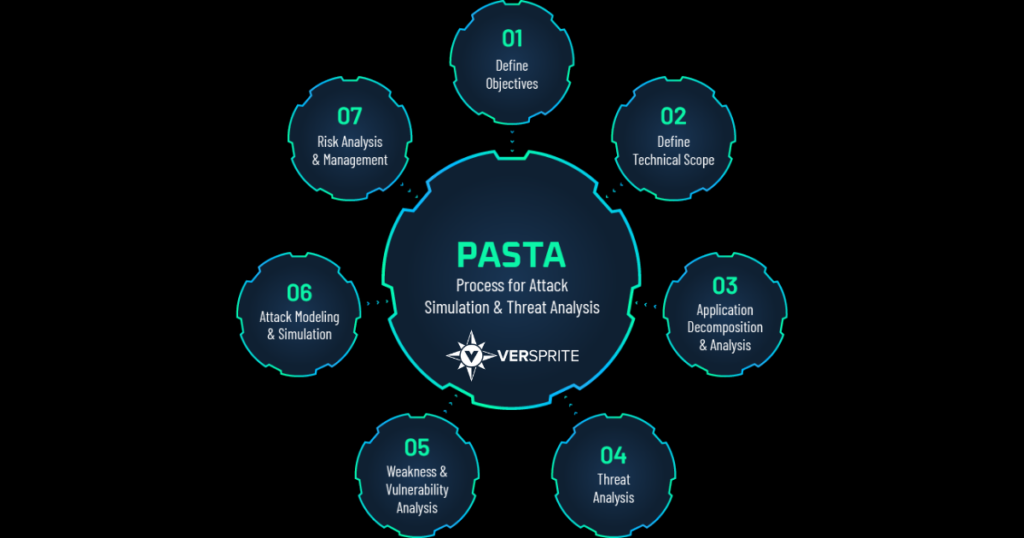
PASTA stands for Process for Attack Simulation and Threat Analysis. It is a seven-stage, risk-centric threat modeling methodology that aligns technical security analysis with business objectives and business impact.
Rather than stopping at broad threat categories, PASTA helps teams determine which adversaries, attack patterns, weaknesses, and attack paths are relevant to a specific application or system. The resulting model supports evidence-based prioritization of countermeasures and residual risk.
| PASTA stage | Primary outcome |
|---|---|
| 1. Define Objectives | Establish business objectives, security requirements, compliance obligations, application criticality, and potential business impact. |
| 2. Define Technical Scope | Identify the technologies, services, infrastructure, data, dependencies, and attack surface included in the analysis. |
| 3. Application Decomposition | Map components, data flows, trust boundaries, users, identities, entry points, dependencies, and security controls. |
| 4. Threat Analysis | Identify relevant threat actors, motivations, capabilities, attack patterns, and intelligence that apply to the environment. |
| 5. Vulnerability and Weakness Analysis | Identify design weaknesses, implementation vulnerabilities, control gaps, and conditions that could enable relevant threats. |
| 6. Attack Modeling | Construct realistic attack scenarios that connect adversary objectives with the architecture, weaknesses, and existing controls. |
| 7. Risk and Impact Analysis | Evaluate inherent and residual risk, business and technical impact, control effectiveness, and prioritized countermeasures. |
- /
- /
- /
- /
- /
- /
- /
- /
- /
- /
- /
- /
- /
- /
- /
- /
- /
- /
- /
- /
- /
- /
What Makes a Tool PASTA-Capable?
A PASTA-capable tool should support the complete reasoning process, not simply attach the PASTA label to a diagram or threat list. Buyers should test whether the platform can preserve context and evidence across all seven stages.
- Capture business objectives, application criticality, regulatory obligations, and impact criteria.
- Maintain a defined technical scope and inventory of in-scope technologies, services, dependencies, and data.
- Represent application components, trust boundaries, users, identities, data flows, entry points, and controls.
- Incorporate relevant threat actors, attack patterns, and threat intelligence.
- Correlate weaknesses and vulnerabilities with the architecture and identified threats.
- Model realistic attack sequences, attacker objectives, prerequisites, and control interactions.
- Calculate or document inherent risk, control effectiveness, residual risk, and business impact.
- Preserve traceability from a risk decision back to the supporting evidence.
- Update the model when architecture, vulnerabilities, controls, threats, or business priorities change.
- Support collaboration among security, engineering, product, architecture, risk, and business stakeholders.
- /
- /
- /
- /
- /
- /
- /
- /
- /
- /
- /
- /
- /
- /
- /
- /
- /
- /
- /
- /
- /
- /
PASTA Threat Modeling Options at a Glance
Fork
Type: PASTA-native commercial platform
How it supports PASTA: Operationalizes the seven stages within a continuous application threat modeling workflow
Best suited for: Organizations seeking repeatable, business-aligned PASTA models across applications
VerSprite Threat Modeling as a Service (TMaaS)
Type: Expert-led PASTA delivery
How it supports PASTA: Applies the methodology through facilitated analysis, adversarial validation, and risk prioritization
Best suited for: Organizations that need specialist expertise, independent validation, or program development
OWASP Threat Dragon
Type: Open-source diagramming and threat-recording tool
How it supports PASTA: Can support architecture decomposition and documentation of threats and mitigations
Best suited for: Teams assembling a custom PASTA workflow with internal expertise
Microsoft Threat Modeling Tool
Type: Free design-stage threat modeling tool
How it supports PASTA: Can support architecture analysis and structured threat identification, especially in Microsoft SDL workflows
Best suited for: Teams using it as one input within a broader PASTA process
Threagile or OWASP pytm
Type: Free design-stage threat modeling tool
How it supports PASTA: Can support version-controlled architecture, threats, assumptions, and automation
Best suited for: Engineering-led teams building custom PASTA artifacts and integrations
Security and risk toolchain
Type: Supporting systems
How it supports PASTA: Threat intelligence, vulnerability data, testing results, ticketing, controls, and risk records can inform multiple PASTA stages
Best suited for: Mature programs integrating PASTA into existing AppSec and risk operations
- /
- /
- /
- /
- /
- /
- /
- /
- /
- /
- /
- /
- /
- /
- /
- /
- /
- /
- /
- /
- /
- /
Fork: A Platform Built Around PASTA
Fork is a continuous application threat modeling platform built around PASTA. It is designed to help security, product, engineering, architecture, and business stakeholders maintain a shared view of application risk as software evolves.
The platform is positioned around the complete risk-centric process rather than a single architecture diagram or one-time workshop. Organizations evaluating Fork should assess how it supports business context, technical scope, application decomposition, threat and weakness analysis, attack modeling, controls, and residual risk across their application portfolio.
- A workflow structured around PASTA and risk-centric analysis.
- Application context that connects technical findings to business purpose and impact.
- Collaboration across security, product, engineering, architecture, and business stakeholders.
- Correlation of threats, weaknesses, vulnerabilities, controls, and attack scenarios.
- Continuous model maintenance as applications and security conditions change.
- Risk prioritization that is intended to be explainable to both technical and business audiences.
- /
- /
- /
- /
- /
- /
- /
- /
- /
- /
- /
- /
- /
- /
- /
- /
- /
- /
- /
- /
- /
- /
Can Other Threat Modeling Tools Support PASTA?
Yes. A tool does not need to be PASTA-native to support part of the methodology. Architecture tools, diagramming applications, threat libraries, vulnerability platforms, attack-mapping systems, risk registers, and ticketing platforms can all contribute useful evidence or workflow support.
The important distinction is between supporting a stage and implementing the methodology. A diagramming tool may help with application decomposition. A vulnerability platform may inform weakness analysis. An attack framework may help structure attack scenarios. A GRC platform may record risk treatment. None of those capabilities, by itself, demonstrates that the complete PASTA process is being performed.
OWASP Threat Dragon in a PASTA Workflow
OWASP Threat Dragon is a free, open-source, cross-platform threat modeling application that supports data-flow diagrams, threat recording, mitigations, and multiple threat categorization approaches. It can be useful during application decomposition and for documenting threats and remediations.
Teams using Threat Dragon with PASTA would still need a defined process for business objectives, threat intelligence, vulnerability correlation, attack modeling, risk analysis, business impact, and residual-risk decisions.
Microsoft Threat Modeling Tool in a PASTA Workflow
The Microsoft Threat Modeling Tool supports design-stage security analysis, architecture communication, threat identification, mitigations, and reporting within Microsoft SDL workflows. It can provide useful architecture and threat-analysis inputs.
A PASTA implementation would need to extend beyond those outputs to incorporate business context, relevant adversary intelligence, weakness correlation, realistic attack modeling, and business-impact-based risk prioritization.
Threat Modeling as Code in a PASTA Workflow
Tools such as Threagile and OWASP pytm can help engineering teams describe systems, assumptions, threats, and controls in version-controlled formats. This can make selected PASTA artifacts easier to review, automate, and update through software delivery workflows.
The organization must still define how business objectives, attacker context, evidence, attack viability, impact, and residual risk are represented. Threat modeling as code is an operating format, not a substitute for the methodology.
- /
- /
- /
- /
- /
- /
- /
- /
- /
- /
- /
- /
- /
- /
- /
- /
- /
- /
- /
- /
- /
- /
How Tools Can Support Each PASTA Stage
Stage 1: Objectives
Useful tool capabilities and data sources:
Business context forms, asset criticality, impact criteria, compliance mappings, risk taxonomy, stakeholder workflows
Stage 2: Technical Scope
Useful tool capabilities and data sources:
Asset inventories, architecture repositories, cloud inventories, software bills of materials, technology enumeration
Stage 3: Decomposition
Stage 4: Threat Analysis
Data-flow diagrams, trust boundaries, component models, identity flows, APIs, dependencies, control mapping
Stage 4: Threat Analysis
Useful tool capabilities and data sources:
Threat intelligence, industry threat libraries, actor profiles, attack-pattern databases, organization-specific threat assertions
Stage 5: Weakness Analysis
Useful tool capabilities and data sources:
SAST, DAST, SCA, cloud findings, penetration testing, code review, CVE and CWE data, design weaknesses
Stage 6: Attack Modeling
Useful tool capabilities and data sources:
Attack trees, attack flows, adversary emulation, exploit validation, ATT&CK and CAPEC mappings, prerequisite analysis
Stage 7: Risk and Impact
Useful tool capabilities and data sources:
Business-impact analysis, risk scoring, control effectiveness, residual risk, remediation priority, executive reporting
- /
- /
- /
- /
- /
- /
- /
- /
- /
- /
- /
- /
- /
- /
- /
- /
- /
- /
- /
- /
- /
- /
How to Compare PASTA Threat Modeling Software
1. Complete Seven-Stage Coverage
Ask the vendor to demonstrate how one application moves through every stage. A platform should show the relationship between objectives, architecture, threats, weaknesses, attacks, controls, and residual risk without forcing teams to reconstruct the reasoning across disconnected systems.
2. Business Context and Impact
PASTA begins with business and security objectives. The tool should allow teams to record why the application matters, who depends on it, which data it handles, what obligations apply, and what consequences would follow from compromise.
3. Relevant Threat Intelligence
Threat analysis should be tailored to the application, industry, exposure, technology, and likely adversaries. Buyers should ask where threat content comes from, how it is updated, and how teams can add organization-specific intelligence.
4. Weakness and Vulnerability Correlation
The platform should connect weaknesses and vulnerabilities to affected components and relevant threat scenarios. Scanner findings should inform the model without becoming the model.
5. Attack Viability
A PASTA implementation should help teams distinguish a theoretical threat from a plausible attack. Look for support for attacker objectives, prerequisites, access, attack sequences, control interactions, and evidence from adversarial testing.
6. Explainable Risk
Risk calculations should be transparent. Teams should be able to explain which factors changed the score, how business impact was assessed, which controls were considered, and why the residual risk is acceptable or requires remediation.
7. Continuous Model Maintenance
Applications, threats, vulnerabilities, and business priorities change. The tool should help teams identify stale assumptions, update affected model elements, preserve history, and reassess risk after meaningful changes.
8. Governance and Collaboration
PASTA involves stakeholders beyond the security team. Evaluate role-based access, ownership, approvals, audit history, reusable templates, portfolio reporting, and workflows for risk acceptance and remediation.
9. Integrations and Data Portability
Review integrations with CI/CD, issue tracking, source control, architecture repositories, vulnerability systems, cloud platforms, threat intelligence, and risk systems. Confirm that complete model data can be exported in a usable format.
10. Expert Support
Software can improve consistency and scale, but mature PASTA implementation requires methodology knowledge and adversarial judgment. Determine whether the vendor provides onboarding, training, model review, program design, and access to experienced practitioners.
- /
- /
- /
- /
- /
- /
- /
- /
- /
- /
- /
- /
- /
- /
- /
- /
- /
- /
- /
- /
- /
- /
PASTA Software vs. PASTA Threat Modeling Services
Primary value
Software-led approach:
Repeatability, collaboration, automation, portfolio visibility, and continuous maintenance
Service-led approach:
Specialist analysis, facilitation, independent validation, attack realism, and program development
Internal expertise
Software-led approach:
Requires trained owners who can validate assumptions and risk decisions
Service-led approach:
Provides external methodology and adversarial expertise
Scale
Software-led approach:
Well suited to recurring use across a portfolio
Service-led approach:
Well suited to high-impact systems, program launch, complex analysis, and quality review
Operating model
Software-led approach:
Owned primarily by internal teams with platform support
Service-led approach:
Delivered or co-managed with external specialists
Best combined use
Software-led approach:
Use software for the living model and workflow
Service-led approach:
Use services for model creation, validation, training, governance, and difficult decisions
- /
- /
- /
- /
- /
- /
- /
- /
- /
- /
- /
- /
- /
- /
- /
- /
- /
- /
- /
- /
- /
- /
When to Choose a PASTA-Native Platform
- PASTA is the organization’s preferred threat modeling methodology.
- Business impact must drive remediation priorities.
- Teams need to analyze realistic attack paths rather than only threat categories.
- Threat models must remain current throughout the application lifecycle.
- Multiple stakeholders need a shared, governed view of application risk.
- The organization wants consistent PASTA models across an application portfolio.
- Existing spreadsheets, documents, and diagrams are difficult to maintain or audit.
- /
- /
- /
- /
- /
- /
- /
- /
- /
- /
- /
- /
- /
- /
- /
- /
- /
- /
- /
- /
- /
- /
When a Supporting Toolchain May Be Sufficient
- The organization already has mature PASTA expertise and a defined operating process.
- The number of applications is small and models are updated infrequently.
- Engineering teams prefer highly customized, code-based workflows.
- Existing architecture, vulnerability, threat intelligence, and risk systems are already integrated.
- The organization can maintain traceability and governance without a dedicated PASTA platform.
- /
- /
- /
- /
- /
- /
- /
- /
- /
- /
- /
- /
- /
- /
- /
- /
- /
- /
- /
- /
- /
- /
When to Use Threat Modeling as a Service
- The organization lacks internal PASTA expertise or available capacity.
- The application is business critical, regulated, safety relevant, or unusually complex.
- Independent validation is required before launch, acquisition, audit, or major change.
- The model requires exploit validation, attack simulation, or offensive security input.
- The organization is creating its first repeatable threat modeling program.
- Existing models need quality review, remediation prioritization, or conversion into a continuous workflow.
- /
- /
- /
- /
- /
- /
- /
- /
- /
- /
- /
- /
- /
- /
- /
- /
- /
- /
- /
- /
- /
- /
Questions to Ask a PASTA Tool Vendor
- Can you demonstrate all seven PASTA stages using one application?
- How does the platform capture business objectives and business impact?
- How are architecture, trust boundaries, identities, data flows, and controls represented?
- How is relevant threat intelligence incorporated and maintained?
- How are weaknesses and vulnerabilities connected to threats and components?
- How does the platform model attack prerequisites, sequences, and attacker objectives?
- Can risk calculations and residual-risk decisions be fully explained?
- How are application changes reflected in the model?
- Which integrations exchange data in both directions?
- How are approvals, ownership, audit history, and risk acceptance governed?
- Can customers export the complete model and its evidence?
- What training and methodology support are included?
- How are AI-generated outputs reviewed and validated?
- Can the platform support application, API, cloud, AI, and organizational use cases?
- What evidence shows that the platform improves prioritization or reduces modeling effort?
- /
- /
- /
- /
- /
- /
- /
- /
- /
- /
- /
- /
- /
- /
- /
- /
- /
- /
- /
- /
- /
- /
Frequently Asked Questions
Is PASTA a threat modeling tool?
No. PASTA is a seven-stage, risk-centric threat modeling methodology. Software such as Fork can operationalize the methodology, while other tools may support individual PASTA activities or artifacts.
What is a PASTA threat modeling tool?
A PASTA threat modeling tool is software that supports the methodology’s business objectives, technical scope, application decomposition, threat analysis, weakness analysis, attack modeling, and risk and impact analysis. A complete implementation should preserve traceability across all seven stages.
Which threat modeling tool is built around PASTA?
Fork is a continuous application threat modeling platform explicitly built around PASTA. Organizations should still evaluate current features, deployment, integrations, governance, and fit for their operating model.
Can OWASP Threat Dragon be used for PASTA?
Threat Dragon can support diagramming, threat recording, and mitigation documentation within a PASTA workflow. Teams must add the business-context, intelligence, weakness-correlation, attack-modeling, impact, and residual-risk processes required by the complete methodology.
Can Microsoft Threat Modeling Tool be used with PASTA?
It can provide useful architecture and threat-analysis inputs, particularly in Microsoft SDL workflows. It does not, by itself, establish a complete PASTA process covering all seven stages.
Does PASTA use STRIDE?
PASTA and STRIDE serve different purposes. STRIDE is a threat categorization mnemonic. PASTA is a broader risk-centric methodology that can use categories, threat intelligence, attack patterns, vulnerabilities, and business impact as inputs to realistic attack and risk analysis.
What is the difference between PASTA software and Threat Modeling as a Service?
Software provides workflow, consistency, collaboration, automation, and continuous model maintenance. Threat Modeling as a Service provides specialist facilitation, adversarial analysis, validation, training, and operating capacity. Many organizations benefit from combining both.
Can AI automate PASTA threat modeling?
AI can help collect context, suggest architecture elements, retrieve threat content, and accelerate documentation. Human review remains necessary to validate assumptions, threat relevance, attack viability, controls, and business impact.
What should a PASTA tool integrate with?
Useful integrations include architecture repositories, source control, CI/CD, issue tracking, vulnerability systems, cloud platforms, threat intelligence, security testing, asset inventories, and enterprise risk systems.
How often should a PASTA threat model be updated?
The model should be reviewed when architecture, data flows, identities, dependencies, vulnerabilities, controls, threat intelligence, business purpose, or regulatory requirements change. High-impact applications may require continuous or release-based updates.
- /
- /
- /
- /
- /
- /
- /
- /
- /
- /
- /
- /
- /
- /
- /
- /
- /
- /
- /
- /
- /
- /
Explore PASTA Threat Modeling
- /
- /
- /
- /
- /
- /
- /
- /
- /
- /
- /
- /
- /
- /
- /
- /
- /
- /
- /
- /
- /
- /
Resources



We’re Not a Vendor We’re Your Security Partner
- Risk-Centric Security
- True Extension of Your Team
- Executive-Level Experience